
How to Get More Google Reviews: 9 Tactics That Work (2026)
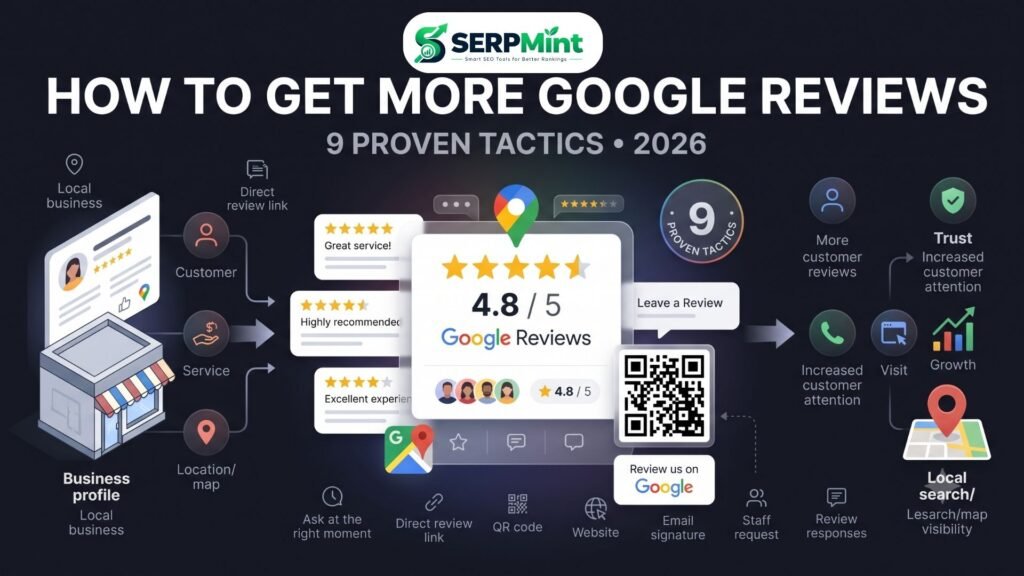
Getting more Google reviews isn’t about begging customers for five stars. It’s about making it easy, timely, and natural for genuine customers to share their experience.
Imagine two similar businesses appearing next to each other in Google Maps. One has 23 reviews, several of them months or years old. The other has 180 reviews, including recent detailed feedback from customers. The second business may look more established and trustworthy before a potential customer even visits its website.
Google confirms that review count and positive ratings can contribute to local prominence and local ranking. Reviews also influence how potential customers evaluate a business after they discover it. So how do you consistently get more reviews without violating Google’s policies? Here are 9 practical tactics that work in 2026, followed by the rules you need to know, response templates, and a quick way to create your direct Google review link.
Why Google Reviews Matter More Than Ever
Google reviews serve two audiences at once:
- Search engines, which use information about a business to understand its local prominence.
- Potential customers, who use reviews as social proof before contacting or buying from a business.
Google says local results are primarily based on relevance, distance, and prominence. Its guidance specifically notes that review count and positive ratings can contribute to prominence and potentially improve local ranking. But don’t reduce your review strategy to chasing a star average.
What actually matters?
A healthy review profile generally has:
- A meaningful number of genuine reviews
- Recent customer feedback
- A strong overall rating
- Reviews that reflect real customer experiences
- Business responses that show customers their feedback is being taken seriously
- A natural pattern rather than an artificial burst of reviews
There is no official Google formula saying that a business needs a specific number of reviews to rank. And while reviews can contribute to local prominence, they don’t override relevance or distance. A business with hundreds of reviews won’t automatically outrank every competitor for every local search. Reviews can also influence how businesses are discussed across search and other answer experiences — but there is no reliable formula that guarantees a certain number of reviews will make an AI system recommend your business. The goal should therefore be simple: build a steady stream of authentic customer feedback.
The 9 Tactics That Actually Work
1. Ask at the Right Moment
Timing can make the difference between “Sure, I’ll do it” and “I’ll do it later.” The best moment is usually immediately after a positive customer interaction — for example:
- After completing a successful service
- Immediately after delivering an order
- When a customer compliments your work
- After resolving a customer’s problem
- At checkout or after a repeat purchase
Instead of saying “Can you leave us a review?”, try: “We’re glad you were happy with the service. If you have a minute, we’d really appreciate your honest feedback on Google.” The important word is honest. You are asking for feedback — not manufacturing a positive rating. Google explicitly allows businesses to ask customers for reviews and recommends using a direct review link or QR code to make the process easier.
2. Remove Friction With a Direct Google Review Link
One of the easiest ways to get more Google reviews is to stop making customers search for your business. Don’t tell someone to search your name, open your profile, scroll to reviews and write one — that’s too many steps. Instead, give them a direct Google review link. Your process becomes: customer finishes purchase → receives link → taps link → writes review. That’s it. You can place the link in SMS messages, email, WhatsApp, your website, invoices, digital receipts, email signatures and post-purchase messages.
3. Print a Google Reviews QR Code Where Decisions Happen
A QR code turns an offline interaction into an online review opportunity. Google itself recommends that businesses can ask customers to visit a review link or scan a QR code to leave feedback. Put your Google reviews QR code where customers naturally see it: restaurant tables, counter displays, receipts, product packaging, delivery bags, business cards, appointment cards, reception desks, checkout counters and service vehicles. For example: “Happy with your experience? Scan to leave us an honest Google review.” Keep the QR code large enough to scan easily and test it from multiple phones before printing thousands of copies. A QR code isn’t useful if it leads to a complicated search process — ideally it takes the customer directly to the review action.
4. Send the Review Link by SMS or Email
Post-purchase follow-ups are one of the simplest ways to build a consistent review process. Send the message after the customer has had enough time to experience your product or service.
SMS template: Hi [Name], thank you for choosing [Business Name]. We hope you were happy with your experience. If you have a moment, we’d really appreciate your honest feedback on Google: [Review Link] Thank you!
Email subject: How was your experience with [Business Name]?
Hi [Name], thank you for choosing [Business Name]. We’d love to hear about your experience. If you have a minute, you can leave us an honest Google review here: [Review Link]. Thank you for your feedback!
Don’t automatically send the request immediately after every transaction if the customer hasn’t had time to evaluate the experience. For a restaurant, that might be shortly after the visit; for a home renovation company, after the project is completed. Match the timing to the customer experience.
5. Add a “Review Us on Google” Button to Your Website
Your website can generate review opportunities even when nobody on your team is actively asking. Add a clear link or button to your footer, contact page, thank-you page, customer support page, about page or confirmation page. Example CTA: “Had a great experience? Review us on Google.” You can also place a small review CTA below customer testimonials: “Want to share your experience? Leave us an honest review on Google.” Don’t hide the link behind several pages — make the action obvious without making it aggressive.
6. Put Your Review Link in Your Email Signature
This is a simple tactic that many businesses overlook. If your employees regularly communicate with customers by email, add a small review link to the signature — for example: “Your Name · Customer Support | Business Name · [Leave us an honest Google review]”. It creates a passive, always-available review opportunity. However, don’t pressure customers by repeatedly asking in every email; the link should be useful and unobtrusive.
7. Give Staff a 10-Second Review Request Script
Employees shouldn’t have to invent what to say. Give them one simple script they can use naturally:
“I’m glad we could help today. If you have a moment later, we’d really appreciate an honest Google review. I can send you the link.”
The goal isn’t to make employees become salespeople — it’s to make asking for feedback a normal part of the customer experience. Train staff to recognize genuine opportunities, especially when customers voluntarily compliment the business. And make one rule clear: never tell employees to ask only customers who are likely to leave five stars. Google’s review policies require genuine experiences, and its guidance specifically warns against incentivized or manipulated review activity.
8. Respond to Every Review
Getting reviews is only half the job — you should also monitor and respond to them. A response shows future customers that the business is paying attention. Keep positive-review responses personal; don’t copy the same paragraph underneath every review. For negative reviews, use this structure: acknowledge → appreciate → move offline → resolve. Don’t argue with customers publicly, don’t reveal private information, don’t write an essay defending your business, and don’t stuff keywords into every response. Your response is primarily customer service, not an SEO exercise. Google itself recommends replying to reviews and says this can show customers that their feedback matters.
9. Make Reviews a Habit, Not a Campaign
One of the biggest mistakes businesses make is treating reviews as a one-time marketing campaign: suddenly asking 50 customers for reviews one week, then stopping for six months. Instead, build reviews into your normal workflow — every completed service gets a review request, every delivery gets a follow-up, every satisfied interaction gets an optional invitation. This creates a natural, ongoing flow. Don’t manufacture artificial review spikes; a sudden wave of reviews can look unusual, and the FTC has specifically warned businesses about deceptive review practices and suspicious bursts. The better strategy is simple: consistent + genuine + customer-driven.
What NOT to Do: Google’s Review Rules
Getting more Google reviews doesn’t mean getting reviews at any cost. Google’s policy is clear: reviews must reflect genuine customer experiences. Offering free or discounted goods or services in exchange for reviews, changing reviews, or removing negative reviews is prohibited fake engagement.
Don’t buy reviews
Never purchase Google reviews from agencies, freelancers, review sellers or online marketplaces. The reviews may disappear — and your business can face consequences for violating Google’s policies.
Don’t offer a discount for a 5-star review
“Leave us a 5-star review and get 10% off” — don’t do this. The FTC’s Consumer Reviews and Testimonials Rule prohibits businesses from providing compensation or incentives conditioned on reviews expressing a particular sentiment, such as positive reviews; the rule took effect on October 21, 2024. Google separately prohibits incentives for reviews, including discounts or free products/services offered in exchange for reviews.
Don’t use review gating
Review gating means screening customers before sending them to Google — for example, “Are you happy? → Send to Google. Unhappy? → Send private feedback.” This deliberately steers positive customers toward public reviews and negative customers away from them. Don’t use this strategy. The safer approach is: ask everyone, influence nothing.
Don’t write fake reviews
Don’t create reviews yourself, don’t ask employees to pretend to be customers, don’t ask friends or family who haven’t genuinely used your business to leave reviews, and don’t buy AI-generated reviews. The FTC’s rule specifically addresses fake or false reviews and testimonials, including reviews from people who did not actually have the relevant experience.
What could happen?
How to Respond to Google Reviews: Copy-Paste Templates
Positive review: Thank you for taking the time to share your experience, [Name]. We’re delighted to hear that you were happy with our service. We truly appreciate your support and look forward to serving you again!
Short positive review: Thank you, [Name]! We really appreciate your feedback and are glad you had a great experience.
Negative review: Thank you for sharing your feedback, [Name]. We’re sorry your experience didn’t meet expectations. We’d like to understand what happened and see how we can improve. Please contact us at [contact information] so we can discuss this directly.
Review with a specific compliment: Thank you, [Name]! We’re especially glad to hear that you enjoyed [specific detail]. We appreciate you sharing your experience and choosing [Business Name].
A simple rule for review responses: be human, be brief, be helpful. Don’t turn every response into an SEO paragraph containing your business name and target keywords.
Get Your Direct Google Review Link in 2 Minutes
You don’t need to manually explain to customers how to find your business on Google — a direct review link makes the process much easier. With the SERPMint Google Review Link Generator, you can create a shareable review link and QR code for your business.
- Step 1: Find your Google Maps Business Profile URL or Place ID.
- Step 2: Paste it into the SERPMint Google Review Link Generator.
- Step 3: Generate your direct review link.
- Step 4: Copy the link and add it to your SMS, email, website, receipt, or customer follow-up.
- Step 5: Generate the QR code and print it on physical materials.
One link becomes your entire review workflow: website, SMS, email, receipts and counter cards — no signup required.
Generate My Review Link →
Google Reviews FAQ
Is it okay to ask customers for Google reviews?
Yes. Google explicitly provides guidance for asking customers to leave reviews and recommends using a review link or QR code to make the process easier. The important requirement is that reviews reflect genuine customer experiences and are not obtained through prohibited incentives or manipulation.
Do Google reviews directly improve local rankings?
Reviews are one factor that can contribute to local prominence. Google states that review count and positive ratings can help a business’s local ranking. However, local rankings also depend primarily on relevance, distance, and prominence, so reviews alone do not guarantee a particular position in Google Maps or local results.
How many Google reviews do I need?
There is no universal number. Don’t focus on reaching an arbitrary target such as 50, 100, or 500 reviews. Instead, build a steady stream of genuine reviews while maintaining excellent customer service. The right benchmark depends on your industry, location, competitors, customer volume, and how established your business is.
Can I offer a discount for a Google review?
You should not offer a discount or free product/service in exchange for a Google review. Google considers incentivized reviews prohibited fake engagement. In the US, the FTC also prohibits incentives conditioned on reviews expressing a particular sentiment, such as positive reviews.
Should I respond to every Google review?
Ideally, yes. Responding gives you an opportunity to thank customers, address concerns, and demonstrate that your business listens to feedback. Keep responses natural, specific, and professional rather than treating them as keyword-stuffing opportunities. Google itself recommends replying to reviews.
Final Takeaway
Getting more Google reviews doesn’t require complicated reputation-management software. It starts with a better process: ask at the right moment → remove friction → use a direct review link → add QR codes → follow up → make asking routine → respond professionally → stay consistent. Most importantly, ask everyone and influence nothing. Don’t buy reviews, don’t gate reviews, don’t offer rewards for five-star ratings, and don’t manufacture feedback. Build a system that makes it incredibly easy for real customers to share what they genuinely think. Over time, those authentic reviews can strengthen your reputation, improve customer confidence, and contribute to the prominence of your business in local search.
Continue your local SEO strategy:
- Google Review Link Generator — create a direct review link and QR code.
- How to Create an XML Sitemap — help search engines discover your important URLs.
- What Is Schema Markup? — learn how structured data helps search engines understand your business.
- Local SEO Guides — explore more strategies for improving local visibility.