SEO for Beginners: How Search Engines Work in Plain English (2026)
You type a question into Google, press Enter, and relevant results appear almost instantly. But what actually happens between typing your query and seeing those results?
Search engines have to discover pages, understand their content, decide whether they should be stored in their index, and determine which results are most useful for your search. That process is the foundation of SEO.
If you’re completely new to SEO, you don’t need to learn hundreds of technical terms first. You need to understand the basic system. In this beginner’s guide, we’ll explain what SEO is, how search engines work, the three pillars of SEO, common mistakes, and how long SEO takes. You’ll also finish with a simple 10-minute SEO audit you can run on your own website using free tools.
What Is SEO? In Plain English
SEO stands for Search Engine Optimization. It is the process of improving a website and its content so that search engines can discover, understand, and potentially rank it for relevant searches.
But there’s an even simpler way to think about it. Imagine you own a physical shop. You want your shop to be easy to find, easy to understand, and worth trusting. SEO does essentially the same thing for a website.
1. Make your website easy to find
Search engines need to be able to discover your important pages. This involves internal links, XML sitemaps, a sensible website structure, crawlable pages, and proper technical configuration.
2. Make your website easy to understand
Search engines need to understand what each page is about. Clear page titles, headings, content, URLs, structured data, and internal links can help communicate that information.
3. Make your website worth trusting
Search engines need signals that your website and content deserve visibility. Depending on the query and business, these signals can include helpful original content, relevant backlinks, brand recognition, reviews, demonstrated expertise, and positive user experiences.
So, in plain English: SEO is about making your website findable, understandable, useful, and trustworthy.
SEO vs. Paid Ads
SEO and paid advertising can both bring visitors from search engines, but they work differently. With paid search advertising, you pay for visibility according to the advertising platform’s system. With SEO, you work to earn organic visibility.
That doesn’t mean SEO is completely free. You may spend money on content, tools, developers, writers, technical improvements, or an SEO professional. The difference is that you’re not directly paying the search engine for every organic click.
- SEO generally looks like this: Create/improve page → Search engine discovers it → Page is evaluated → Page may rank → Users click → Traffic can continue.
- Paid advertising generally looks like this: Create ad → Set budget/targeting → Ad is eligible to appear → User clicks → You pay according to the advertising system.
SEO is usually slower to build, but a successful page can continue attracting organic traffic without paying for every visit. That’s why SEO is often viewed as a long-term, compounding marketing channel rather than an overnight traffic solution.
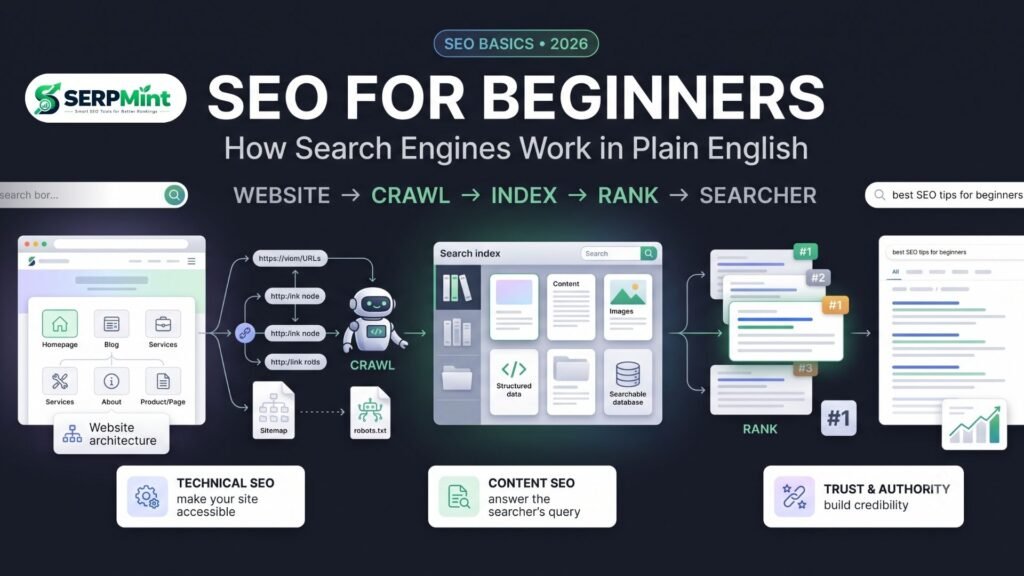
How Search Engines Work: Crawl → Index → Rank
One of the most important SEO basics is understanding these three words: Crawling → Indexing → Ranking. Think of them as three different stages.
Step 1 — Crawling: Search Engines Discover Pages
Search engines use automated systems called crawlers or bots to discover URLs and retrieve pages. Google’s crawler, for example, is commonly known as Googlebot. How can a crawler discover a page? One major method is by following links (e.g., Homepage → Blog → SEO Guide → Beginner SEO Article). XML sitemaps can also provide search engines with a list of URLs that you consider important. However, submitting a URL in a sitemap doesn’t guarantee that Google will crawl or index it.
Why robots.txt matters: Your robots.txt file can provide instructions about which areas crawlers should or shouldn’t access. For WordPress websites, a properly configured robots.txt file can help keep crawler access focused on appropriate areas.
Related guides: How to Create an XML Sitemap · Robots.txt for WordPress
Step 2 — Indexing: Search Engines Understand and Store Pages
After discovering a page, a search engine can process its content and determine whether it should be included in its index. Think of the index as an enormous library. Crawling is like discovering a new book; indexing is like analyzing that book and deciding where it belongs in the library.
Search engines analyze page content, titles, headings, images, links, structured data, language, and technical signals. Structured data (schema markup) can provide additional machine-readable context about entities and content. But remember: adding schema does not automatically make a page rank higher. It helps search engines understand eligible content and can make a page eligible for certain search features.
Related guide: What Is Schema Markup?
Step 3 — Ranking: Which Result Should Appear First?
When someone searches for something, search engines have to determine which results are most relevant and useful for that particular query. They consider relevance to the query, content quality, search intent, website signals, links, location, freshness, and technical accessibility. There isn’t one universal “SEO score” or a magic checklist that guarantees position #1. Instead, SEO is about improving the overall ability of your website to satisfy relevant searches.
Why Some Pages Never Appear in Google
If you publish a page and it doesn’t appear in Google, it doesn’t necessarily mean your SEO has failed. Possible reasons include: the page hasn’t been discovered yet; crawling is blocked by robots.txt; the page has a noindex directive; the page is a duplicate; the content isn’t useful enough; the website is brand new; or the page doesn’t satisfy search intent (e.g., targeting “best running shoes” with a 300-word definition instead of a buying guide).
The 3 Pillars of SEO
You can simplify most SEO work into three major areas:
| SEO Pillar | Question It Answers | Example Tasks |
|---|---|---|
| Technical SEO | Can search engines access and understand the website? | Robots.txt, XML sitemap, schema, indexing, site speed |
| On-Page & Content SEO | Does the page answer the searcher’s question well? | Titles, headings, keywords, content, internal links |
| Off-Page & Trust | Do other signals support the website’s credibility? | Backlinks, reviews, mentions, reputation |
1. Technical SEO
Technical SEO focuses on the infrastructure behind your website. The goal is to make your website accessible and understandable. Common tasks include checking crawlability, managing robots.txt, creating XML sitemaps, fixing indexing problems, implementing structured data, improving page speed, and ensuring mobile usability. Start with the fundamentals: Robots.txt → Sitemap → Indexing → Schema → Performance.
2. On-Page & Content SEO
On-page SEO focuses on what is actually present on your pages: title, meta description, headings, main content, keyword usage, and internal links. The objective isn’t to insert a keyword 50 times; it’s to create the best useful answer for the searcher. (See our guide on How to Write Meta Titles and Descriptions).
3. Off-Page & Trust
Off-page SEO focuses on signals outside your website, like relevant, editorially earned backlinks. For local businesses, reputation signals such as genuine customer reviews are also important. Your website says “We are good at this,” but external signals demonstrate “Other people and organizations recognize this business too.”
Your 10-Minute Starter SEO Audit
You don’t need an expensive SEO platform to start learning. Spend 10 minutes checking these five areas on your website.
1. Check Your Homepage Title and Description
Is the title descriptive? Does it explain what the business does? Is it written for humans? Does the meta description accurately summarize the page?
2. Check Your Structured Data
Check whether your website uses relevant structured data (Organization, LocalBusiness, Article, Product). Don’t add schema simply because you can; use it to accurately represent your content.
3. Check Your robots.txt
Visit https://yourdomain.com/robots.txt. Look for accidental rules that could block important areas, particularly Disallow: /, which blocks crawling across the entire site.
4. Generate and Submit Your XML Sitemap
Find your XML sitemap (often /wp-sitemap.xml or /sitemap_index.xml). Ensure it contains important, canonical URLs, then submit it through Google Search Console.
5. Do You Have a Local Business?
Make it easy for customers to leave genuine feedback. Create a direct Google review link and share it through email, SMS, receipts, or QR codes.
Put the basics into practice with our free, no-signup toolkit.
Browse the Toolkit →How Long Does SEO Take?
The honest answer is: It depends. SEO results can take weeks to months, and meaningful growth often requires longer-term work. A new website may take longer because it has little search history, few backlinks, and limited content. An established website may see improvements faster.
Don’t expect overnight results. SEO is rarely “Publish today → Rank tomorrow.” A more realistic process is: Research → Create → Optimize → Publish → Measure → Improve → Repeat. Consistency generally beats intensity, and you should be skeptical of anyone who guarantees #1 Google rankings.
Common SEO Mistakes Beginners Make
- Keyword Stuffing: Repeating a keyword unnaturally doesn’t make content better. Write naturally and cover the topic comprehensively.
- Copying Competitors: Use competitors to understand search intent, then create something genuinely useful and original.
- Buying Manipulative Links: Don’t build hundreds of random backlinks. Focus on relevant, legitimate opportunities.
- Ignoring Mobile and Page Experience: Check mobile layout, navigation, readability, loading performance, and Core Web Vitals.
- Never Checking Search Console: GSC provides valuable information about queries, indexed pages, and technical issues. Learn to use it.
- Expecting Overnight Results: Build systematically. SEO is a process, not a switch.
SEO Basics FAQ
What is SEO in simple words?
SEO is the process of improving your website so search engines can find, understand, and potentially rank its pages for relevant searches. It also involves making those pages useful and appealing to people who visit them.
Is SEO free?
Organic search traffic doesn’t require paying Google for each click, but SEO itself isn’t necessarily free. You may invest time, content, tools, or professional services. The good news is that beginners can start implementing many fundamentals with free tools.
How long until I see SEO results?
There is no universal timeline. Some changes produce improvements relatively quickly, while competitive keywords and new websites can take months or longer. Results depend on competition, authority, content quality, and technical health.
Does a small website really need SEO?
Yes. A small website can benefit from SEO because search engines help people discover it without relying entirely on paid advertising. For local businesses, basic SEO is especially valuable for searches related to services and location.
What should a beginner learn first?
Start with the basics: understand search intent, learn how crawling/indexing/ranking works, learn basic keyword research and on-page SEO, understand internal linking, and set up Google Search Console. Build your knowledge one layer at a time.
Final Takeaway: Be Findable, Understandable, and Trustworthy
If you’re completely new to SEO, don’t get overwhelmed. Remember three ideas:
- Be Findable: Crawling → Links → Sitemap → Technical accessibility.
- Be Understandable: Content → Titles → Headings → Structure → Schema.
- Be Trustworthy: Useful content → Relevant links → Reviews → Reputation.
Use this article as your “Start Here” guide. As you learn more, explore our deeper guides on On-Page SEO, Technical SEO, and Local SEO. The more you understand how search works, the easier it becomes to make smarter SEO decisions.